

Learn 7 clear signs your hot sleeper mattress traps heat, disrupts sleep, and what to change before replacing your bed.
If you wake up sweaty, flip the pillow, stick a leg out, and still feel like your bed is holding heat, your room may not be the only issue. A hot sleeper mattress can trap warmth and humidity right under the covers, which keeps your body from shedding heat the way it needs to at night.
TL;DR: Summary
- A mattress can absolutely make you sleep hot, especially if dense memory foam, synthetic bedding, mattress protectors, and heavy comforters create a warm bed microclimate around your body.
- Sleep experts commonly recommend a bedroom temperature of 60°F to 67°F, or 15.5°C to 19.5°C, because sleep onset and stable sleep work better when your body can release heat.
- The clearest signs include waking sweaty in normal room temperatures, feeling heat build up where your body touches the mattress, sleeping cooler in other beds, and getting only limited relief from lowering the thermostat.
- If the room is already cool but the bed still feels stuffy, airflow between the sheets is often more effective than turning the AC lower. Neither Bedfan nor BedJet cools the air itself, they use the cooler air already in the room.
- A bed fan can be a practical workaround before replacing a mattress. Many people can raise room temperature by about 5°F and still sleep cool enough for better rest when a Bedfan moves air under the covers.
- If night sweats are frequent, drenching, new, or tied to fever, weight loss, menopause, medication changes, or other symptoms, cooling the bed may help comfort, but it should not replace medical advice.
That’s the key distinction most people miss, your bedroom temperature and your bed temperature are related, but they are not the same thing. If the problem is trapped heat inside the sheets, comforter, and mattress surface, targeted airflow can help even when your thermostat is already in the recommended range.
Yes. Dense memory foam, synthetic quilting, and heavy bedding can trap the heat and moisture your body gives off, creating a warmer bed microclimate than the rest of the room.
A lot of people assume a hot bed means a hot house. Sometimes that’s true, but not always. Your body releases heat all night, and if your mattress stack, meaning the mattress, protector, fitted sheet, and comforter, doesn’t let that heat escape, it builds up around you.
That matters because good sleep is tied to heat loss. Sleep research has long shown that sleep onset comes with a drop in core body temperature and increased heat release through the skin. If your bed keeps that heat bottled up, you may take longer to fall asleep, wake more often, or feel restless in the early morning hours.
The bedroom still counts. Sleep experts commonly recommend keeping the room between 60°F and 67°F, or 15.5°C to 19.5°C, for better sleep. Still, a room in that range can feel too warm if your mattress is storing heat right where your shoulders, hips, back, and legs press into it. One common misconception is that a mattress labeled “cooling” will fix everything on its own. A cooling cover may feel nice at first touch, but if the full bed system still traps heat, that brief cool sensation wears off fast.
"bFan is built to move room air between the sheets so trapped body heat can escape, instead of trying to cool the whole bedroom."
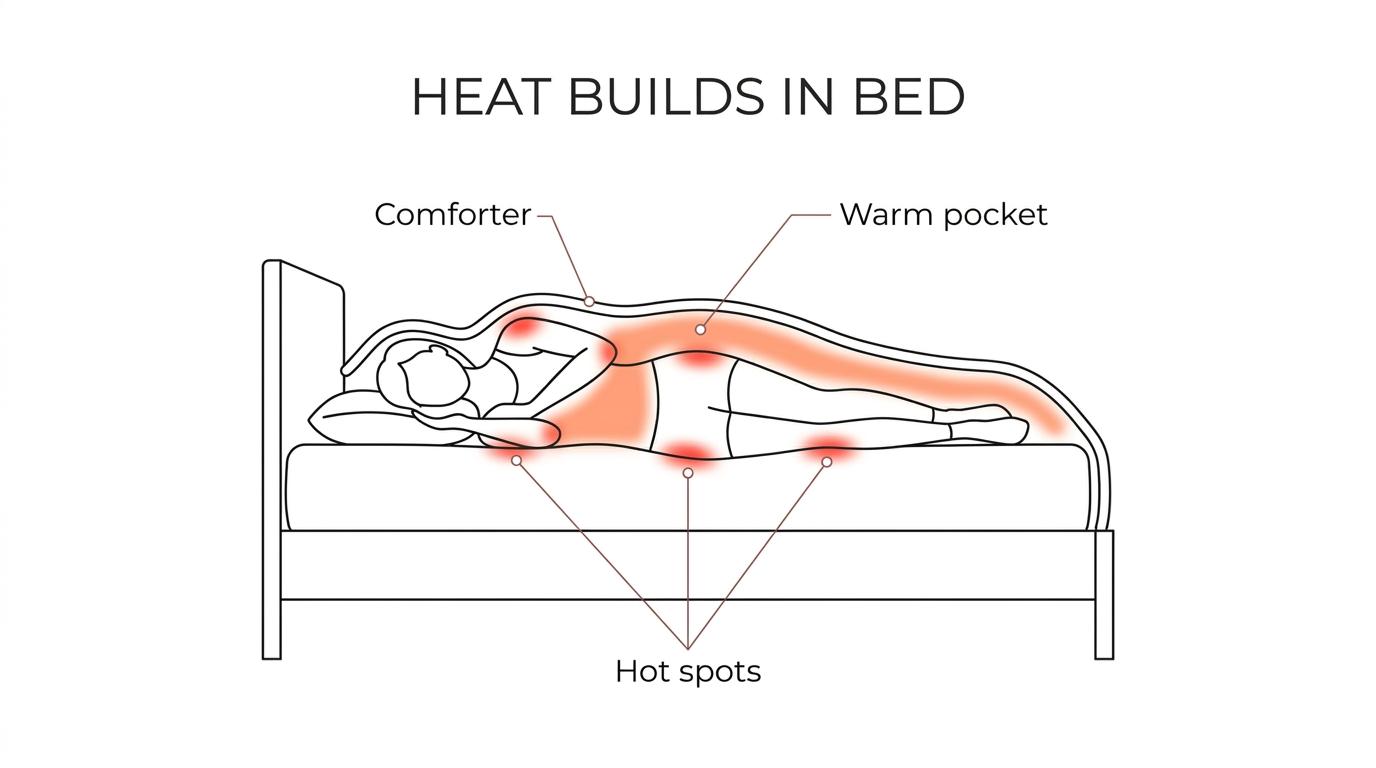
It has a direct effect. Your bed microclimate, the small pocket of heat and humidity around your skin, can either help heat escape or hold it in and disrupt sleep.
Think of bed microclimate as the weather inside your bedding. Your room might be 65°F, but the air trapped under your comforter can feel much warmer once your body has been in one spot for an hour or two. That’s why many hot sleepers feel okay when they first get in bed, then overheat later.
There’s real physiology behind this. As you get sleepy, blood vessels near the hands and feet widen, a process called vasodilation, which helps the body dump heat. Researchers also talk about the distal proximal skin temperature gradient, which is a technical way of describing the temperature difference between your hands and feet and the rest of your body. When heat can leave the body well, sleep onset latency, the time it takes to fall asleep, tends to improve.
When heat cannot leave well, sleep often gets lighter and more fragmented. Research summarized by expert sleep sources points to an overly warm sleep environment being linked to worse sleep quality. One older heating study found that a rise in core body temperature of 0.18°C in the early morning period was associated with a 5.5% drop in sleep efficiency between 03:30 and 07:30. You don’t need to memorize the number. The practical takeaway is simple, even a small rise in retained body heat can show up as more tossing, lighter sleep, and more wakeups.
A useful pro tip here, don’t judge temperature only by your face or the air above the blanket. If your back, hips, or thighs feel stuck in a warm pocket, the mattress is likely part of the problem.
Usually, the signs are pretty consistent. If you notice heat buildup in contact areas, repeated wakeups, and only partial relief from lowering the thermostat, your mattress is a strong suspect.
You do not need a lab test to spot a hot sleeper mattress. Most people can identify the pattern from what happens night after night, especially if the room temperature is reasonable and the overheating feels centered in the bed itself.
You wake up sweaty, even when the room feels normal: If the thermostat is already in the 60°F to 67°F range and you still wake warm, the mattress or bedding stack may be trapping heat around your body.
The heat is strongest where your body touches the bed: Hot hips, shoulders, lower back, and thighs often point to a contact heat problem, not just a warm room.
You feel cooler after throwing off the covers, but heat returns when you tuck back in: That usually means the trapped air under the sheets is reheating quickly.
You sleep better in hotels, guest rooms, or on another mattress: Same person, different bed, better sleep is one of the strongest clues.
Your mattress protector or topper seems to make things worse: Waterproof layers, toppers, and synthetic pads can cut airflow and hold more warmth.
Your bed feels humid or stuffy, not just warm: Heat and moisture tend to travel together, and humidity trapped under bedding often makes overheating feel worse.
Lowering the thermostat helps only a little, but your energy bill climbs a lot: If you keep pushing the AC colder and still sleep hot, the real issue may be the bed microclimate, not just the room.
If you checked several of those, don’t assume you need a brand new mattress tomorrow. Plenty of people can improve the situation by changing the bedding stack, removing one heat trapping layer, or adding airflow between the sheets before making a major purchase.
You can usually separate them with a simple pattern check. A hot room feels warm everywhere, while a hot mattress feels hottest where your body meets the bed.
Start with the room itself. If your bedroom is consistently above 67°F, room heat is part of the problem, no question. But if the room is near 62°F to 67°F and you still wake up feeling baked from the waist down or across your back, the mattress and bedding are probably doing most of the damage.
After a few nights, the clues tend to sort themselves out pretty clearly.
If your room is already in the recommended range, targeted cooling often makes more sense than driving the AC even lower. This is where a Bedfan can help, because it works on the bed microclimate instead of the whole house. Many people can raise the room temperature by about 5°F and still sleep cool enough for more restful sleep when airflow is moving under the sheets.
"bFan uses about 18 watts on average, so it targets the bed microclimate without the energy draw of cooling the whole room."
Dense foams usually trap the most heat. Traditional memory foam, thick polyfoam comfort layers, and plush pillow tops tend to hold more warmth than coil based or more open designs.
Memory foam is the usual culprit because it hugs the body closely. That contouring can feel great for pressure relief, but it also reduces space for airflow around the skin. The deeper you sink in, the more of your surface area stays in direct contact with the material, and the harder it is for heat to escape.
Polyfoam can have similar issues, especially in thick upper layers. Add a synthetic mattress protector and a heavy comforter, and you’ve basically wrapped the bed in insulation. Latex often sleeps less stuffy than memory foam because it tends to be springier and a bit more breathable, though that depends on the exact build. Hybrid mattresses with coil support cores often allow better airflow than all foam beds, but the comfort layers on top still matter a lot.
This is where marketing can throw you off. “Cooling gel,” “cool touch cover,” and similar claims are not meaningless, but they’re often short term or surface level. A cover that feels cool for the first five minutes does not guarantee the mattress will stay cool three hours later. A useful misconception to clear up, more softness is not always more comfort if it causes overheating. A slightly firmer, more breathable sleep surface may feel much better over a full night.
You can test it in seven nights. Track the room, strip out one variable at a time, then add targeted airflow and compare what changes.
Step 1, get a baseline for two nights. Set the room to a realistic sleep temperature, ideally within 60°F to 67°F, and keep everything else the same. Write down when you go to bed, whether you wake sweaty, where you feel hottest, and whether you toss the blankets off. Keep alcohol, spicy food, and late exercise in mind, since all three can muddy the picture.
Step 2, change only the bedding stack for the next two nights. If you use a waterproof protector, thick topper, flannel, brushed microfiber, or a very heavy comforter, swap one or two of those for more breathable options. Cotton percale, a lighter blanket, and less loft can make a noticeable difference. If you improve quickly, the mattress may still be warm, but the bedding was amplifying it.
Step 3, add airflow under the sheets for the final three nights. This is the cleanest way to test whether trapped bed heat is the real issue. A bed fan like the bFan moves room air between the sheets so body heat can escape right where it builds up. If your sleep improves without lowering the thermostat much more, that points strongly to a bed microclimate issue rather than a whole room temperature problem.
This kind of test works because you’re not guessing. You’re comparing your own sleep with one variable changed at a time.
The right bedding can help a lot. Lighter layers, breathable fabrics, and less plastic between you and the mattress often reduce heat buildup fast.
Start with the layer that often causes the most trouble, the mattress protector. Some protectors are worth keeping for spills and allergies, but many are made with less breathable barriers that hold heat and humidity. If yours crackles, feels plasticky, or seems to trap warmth, it may be doing more harm than you think.
Next, look at your sheets. Tight weave sheets are often a smart match when using a Bedfan, because they help direct airflow across your body and carry heat away instead of letting the breeze leak out too quickly. Cotton percale is a common choice for hot sleepers because it feels crisp and less insulating than brushed fabrics. Higher thread count is not automatically cooler, that’s another common mix up. The weave, fiber, and finish matter more than a big number on the package.
Then check your comforter. If you sleep under a thick all season or winter comforter year round, you may be trapping more heat than your body can offload. A lighter blanket or a breathable duvet insert can make a big difference. If you share a bed with someone who sleeps colder, separate blankets often work better than one heavy compromise comforter.
Bedding alone will not turn a heat retentive mattress into a cool one, but it can remove a lot of the extra insulation sitting on top of the real problem.
A Bedfan helps most when the room is already fairly cool but the bed still feels hot. It targets trapped heat under the covers instead of cooling every cubic foot of the room.
This is the sweet spot for a bed fan. If your bedroom is already in the recommended 60°F to 67°F range and you’re still overheating, the issue is probably not just the thermostat. It’s the warm air pocket between your body, sheets, and mattress. A Bedfan moves that air, which helps heat escape and makes the bed feel less stuffy.
That’s also why a bed fan can save money compared with overusing air conditioning. Many people can raise room temperature by about 5°F and still sleep cool enough when a Bedfan is moving air under the covers. The product is not cooling the air itself, and neither does BedJet. Both use the cooler room air already available. The difference is that a Bedfan directs that air where the trapped heat actually is.
Timer controls matter here too. Many people need the most cooling help during sleep onset, when the body is trying to drop core temperature. A Bedfan with remote controlled airflow gives you a practical way to cool the bed early in the night without needing max airflow all night long.
"The original Bedfan uses room air already in the bedroom, and many sleepers can raise room temperature by about 5°F while still feeling cooler in bed."
Both products use room air, not refrigerated air. The biggest differences are price, setup style, and how simply they solve bed heat under the covers.
This comparison matters because people often assume one of these systems is actually air conditioning for the bed. It isn’t. Neither Bedfan nor BedJet cools the air itself. If the room is hot, both will pull in hot room air. If the room is reasonably cool, both can help move that air through the bed microclimate.
Where the tradeoff gets real is cost and complexity. One BedJet is more than twice the price of a single Bedfan. A dual zone BedJet setup costs over a thousand dollars, which is more than twice the price of two bedfans. By contrast, two bFan units can create dual zone microclimate control at a fraction of that cost. If you and your partner want separate airflow on each side of the bed, that price gap is hard to ignore.
There are also practical differences. The original Bedfan came to market in 2003, several years before BedJet was even thought of, and the category itself started there. The bFan is designed as a between the sheets bed fan, with remote controlled airflow, adjustable height, and a sturdy base. It uses about 18 watts on average, and normal operating sound is about 28db to 32db, which is low enough for many sleepers who are sensitive to noise. If you want a targeted, lower cost fix before replacing a hot sleeper mattress, the bFan from bedfans usa is a sensible solution to consider.
"Dual zone BedJet costs over a thousand dollars, while two bFan units provide dual zone microclimate control for much less."
Setup matters a lot. The coolest results usually come from correct sheet choice, smart fan placement, and a room that is cool enough to supply usable air.
Step 1, start with the room. Try to keep the bedroom somewhere in the 60°F to 67°F range if you can. If that has been too expensive with AC alone, add the Bedfan first, then test whether you can raise the thermostat by about 5°F and still stay comfortable. Since the fan uses room air, the room still needs to be reasonably cool.
Step 2, place the fan so airflow moves between the sheets instead of blasting randomly at your body from above the blanket. The goal is to flush out the trapped warm air pocket. With many setups, positioning the airflow from the foot or lower side of the bed works best because it lets the breeze travel across more of your body.
Step 3, pair it with the right bedding. Tight weave sheets usually work better with a Bedfan because they help carry air along the body instead of letting it escape immediately. Keep the top layers light enough that air can move. If you share a bed and one person sleeps hotter, two bedfans can create a simple dual zone setup without forcing both sleepers into the same temperature preference.
One more pro tip, don’t block the intake area with drapes, storage bins, or piles of bedding. And if noise matters to you, a product operating around 28db to 32db at normal speed is usually much easier to live with than a loud room fan pointed at the whole bed.
Sometimes night sweats are mostly a heat problem, and sometimes they are not. If they are frequent, drenching, new, or paired with other symptoms, it is smart to get medical guidance.
A warm mattress, dense foam, or a stuffy comforter can absolutely make you sweat at night. So can a room that never gets below the low 70s. But repeated night sweats can also be tied to menopause or perimenopause, medication side effects, anxiety, infections, thyroid issues, diabetes, sleep apnea, and other medical conditions.
Certain medications are known triggers, including some antidepressants, steroids, blood pressure medicines, and diabetes treatments. Hormonal changes are a big one too. Many women in perimenopause and menopause deal with hot flashes and night sweats, and a cooler bed setup can help comfort even while the underlying cause needs its own plan.
A simple rule of thumb helps here. If your sweating is mild and clearly linked to a warm bed, try fixing the sleep environment first. If the sweating is drenching, sudden, tied to fever, weight loss, chest symptoms, medication changes, or it keeps happening even in a cool room with better airflow, talk with a clinician. A hot mattress can make symptoms worse, but it is not always the whole story.
You often can buy time. Small changes to airflow, bedding, and room temperature can make a hot mattress much more tolerable before you spend on a full replacement.
The first move is to stop stacking heat. Remove or replace the worst offenders, thick topper, less breathable protector, heavy comforter, brushed synthetic sheets. Then get your room into the recommended sleep range as consistently as you can. That matters because even the best bed setup works better when the room is supplying air in the 60°F to 67°F range.
After that, target the trapped heat itself. A Bedfan is often one of the most practical ways to do that, because it addresses the pocket of warm air under the sheets rather than asking your air conditioner to overcool the whole home. Since the bFan uses about 18 watts on average, it can also be a more energy sensible way to stay comfortable. If airflow solves most of the issue, you may be able to postpone a mattress replacement, or at least shop for one without rushing.
If you do end up replacing the mattress later, you’ll have learned something useful first. You’ll know whether your real issue was the mattress material, the bedding stack, the room temperature, or some mix of all three. That puts you in a much better position than just guessing based on a cooling marketing claim.
Sleep Foundation guide to the best temperature for sleep, explains the commonly recommended 60°F to 67°F bedroom range and how too much warmth can hurt sleep quality.
CDC sleep health resources, offers public health guidance on sleep habits and why sleep environment and sleep quality matter.
National Heart, Lung, and Blood Institute sleep information, covers how healthy sleep works and why stable, restorative sleep supports overall health.
Mayo Clinic overview of menopause symptoms, gives a solid summary of hot flashes and night sweats that can overlap with heat related sleep complaints.
Copyright 2005 - present - Tompkins Research, Inc. & Kurt W. Tompkins All Rights Reserved DO NOT COPY. bFan® and the word bfan® in any format is a registered trademark of Kurt W. Tompkins the word BFAN® in any format shall not be used without written permission of the mark owner. This includes specifically Brookstone where you like to bait and switch, do not use my mark to bait customers.