
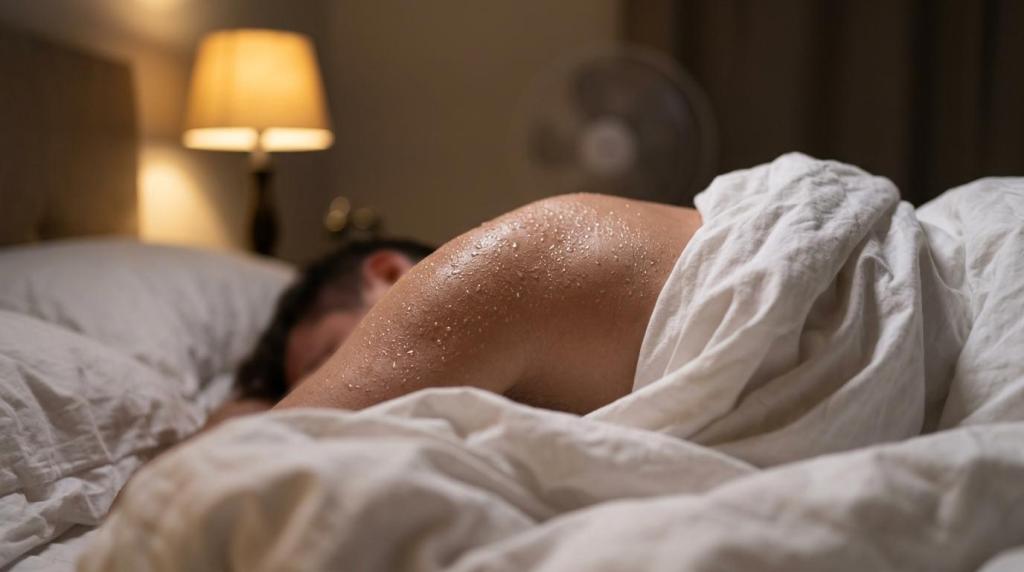
Learn 7 signs your bedroom fan isn’t fixing overheating, from trapped bedding heat and humidity to a room that’s simply too warm.
A bedroom fan can absolutely help you sleep cooler, but it also gets blamed for problems it cannot fix on its own. If you still wake up sweaty, sticky, or wide awake at 3 a.m., the issue may be the room, the humidity, or the heat trapped under your bedding, not just the fan.
TL;DR: Summary
- A bedroom fan is not solving overheating if you still wake sweaty, only feel relief when you throw off the covers, or sleep better immediately in a cooler, drier room.
- Sleep experts commonly recommend a bedroom temperature between 60°F and 67°F, 15.5°C to 19.5°C, and Harvard Health places the sweet spot around 65°F to 68°F, so a fan has less to work with when the room stays warmer than that.
- Humidity matters almost as much as temperature, because sticky air slows sweat evaporation, raises thermal discomfort, and can reduce sleep efficiency, REM sleep, and deep sleep in hot conditions.
- Bedding and sleepwear can overpower a fan by trapping heat and moisture, especially when the airflow never reaches the under covers microclimate around your skin.
- Neither Bedfan nor BedJet cool the air itself, they both use the cooler room air available, which is why room temperature still matters. A bed fan can help many people raise the room thermostat by about 5°F while still sleeping cool enough for better rest.
- If your room is very hot, very humid, or near 90°F or higher, a fan alone may be inadequate, and in extreme heat it can even work against you, so you may need AC, dehumidification, or a targeted bed fan strategy.
A better question is not, “Is my fan powerful enough?” It’s, “Is my whole sleep microclimate actually getting cooler?” Once you look at room temperature, relative humidity, bedding, and where the airflow goes, the reason a fan is failing usually gets pretty clear.
Yes, a strong ceiling fan or tower fan can still fail if it never reaches the trapped heat under bedding. Thermal comfort depends on room temperature, relative humidity, and whether airflow hits exposed skin or the under covers microclimate around your body.
A basic room fan helps by increasing air movement across your skin. That supports heat loss and sweat evaporation, which is useful when the room is already reasonably cool. The problem is that sleep overheating often happens under the covers, where body heat and moisture collect in a warm pocket your fan never touches.
That is why two people can sleep in the same bedroom, with the same fan running, and have very different nights. One person sleeps fine. The other wakes up damp, kicks off the blanket, cools off for ten minutes, then pulls it back on and overheats again. That pattern is a clue that the trapped bed microclimate is the real problem.
A common mistake is assuming fan speed equals cooling performance. It doesn’t. If the room air is too warm, or if the air never gets under the covers, you are just moving the problem around. In a 14 day bedroom study with 62 participants, sleep efficiency dropped as bedroom temperature increased, and humidity was also linked with sleepiness and poor sleep quality.
If you need the airflow to reach under the bedding, a bed fan works on a different principle than a box fan at the door. It moves room air between the sheets, where the heat is actually building up.
"bFan uses about 18 watts on average, which makes targeted bed cooling a much lower energy move than pushing the whole house AC colder."
That targeted approach matters because neither a regular bedroom fan nor a bed fan makes the air colder than the room. They use the cool air already available. If the ambient room is badly overheated, every fan has less to work with.
You can check this fast with a thermometer and three nights of notes. A Honeywell room thermometer or a smart sensor near bed height will tell you more than a hallway thermostat.
Step 1, measure the actual temperature near where you sleep, not across the room and not near the ceiling. Bedrooms often stratify, meaning warm air pools in one zone while the thermostat reads something friendlier elsewhere. If your bed area is sitting above 67°F to 70°F most of the night, your bedroom fan may be trying to cool you in conditions that are already working against sleep.
Step 2, note the temperature at bedtime, around 3 a.m., and when you wake up. A lot of people assume their room stays steady all night. It often doesn’t. Solar heat stored in walls, poor attic insulation, or an HVAC cycle can push the room warmer after midnight.
Step 3, compare the numbers with how you feel. Sleep experts commonly recommend 60°F to 67°F for better sleep, and Harvard Health points to about 65°F to 68°F. If you fall asleep fine at 66°F and wake hot at 71°F, the fan is not the whole story. The room is drifting out of the range where thermal comfort is easiest.
Here’s the useful part, if you switch from a general bedroom fan to a bed fan that moves air where your body is actually overheating, many people can raise the room temperature by about 5°F and still feel cool enough for more restful sleep. That can trim AC use without making the bed feel stifling.
Pro tip, trust the sensor by your mattress more than the thermostat in the hallway. The hallway is not where you’re trying to sleep.
These signs are usually pretty obvious once you know what to watch for. If two or more show up regularly, the problem is probably your sleep environment, not just your willingness to run a fan all night.
A fan that is helping should reduce wakefulness, lower that clammy feeling, and make it easier to stay asleep. If it is just blowing around warm air, the pattern looks different.
A lot of people miss sign number six. They assume the loudest fan must be the most effective. In sleep, comfort beats brute force. If the fan is disrupting sleep without solving the heat, that is a loss on both fronts.
Yes, high humidity can make a fan feel far less effective, even when the temperature does not seem outrageous. A fan helps your body shed heat partly through evaporation, and sticky air slows that process down.
This is where the term relative humidity really matters. When humidity is high, sweat stays on your skin longer instead of evaporating efficiently. You feel clammy, warm, and restless. That is bad for thermal comfort, and it can spill over into more wakefulness and less restorative sleep.
A classic human sleep study found that humid heat exposure at 35°C with 75 percent relative humidity increased wakefulness and reduced sleep efficiency compared with cooler test conditions. REM sleep and stage 3 sleep also dropped under the hottest humid condition. In plain English, humid heat made sleep lighter, choppier, and less restorative.
That’s why a fan can feel fine at 68°F on a dry night and useless at 68°F on a muggy one. The temperature number stayed the same, but your body’s ability to dump heat changed.
A common misconception is that you just need more fan speed. That same moisture problem shows up in other sleeping environments too, and Nordic Gear’s guide to condensation in tents makes the parallel clearly: airflow helps, but enclosed spaces still need real moisture control if you want to stay dry and comfortable. If the room is muggy, more airflow can help a bit, but it does not remove moisture from the air. If your bedroom regularly feels sticky, a dehumidifier or AC is often the missing tool. Then the fan starts working better because the air can actually carry heat away.
The same logic applies to targeted bed cooling. A Bedfan and BedJet both move room air, but neither one dehumidifies the room or cools the air itself. They use the room air you already have. If that air is warm and wet, the gain will be smaller.
Absolutely, bedding can overpower a fan by creating an insulated pocket of warm, damp air around your body. A duvet, memory foam surface, and heavy sleepwear can stack heat faster than a room fan can remove it.
This is where the sleep microclimate idea becomes useful. Your body does not sleep in the whole room. It sleeps inside a small thermal system made up of mattress, sheets, blankets, pajamas, and whatever airflow reaches your skin.
A 2024 systematic review in the Journal of Sleep Research found that bedding and sleepwear materials can affect sleep quality by influencing skin temperature, body temperature, and thermal comfort. Under warm conditions, linen bedsheets improved sleep quality in young adults. That does not mean linen is the only answer, but it does show that fabric choice matters.
If you use a bed fan, there is an interesting tradeoff that surprises people. Very loose bedding is not always best for under covers airflow. A tighter weave top sheet can help the air travel across your body and carry away heat more evenly. That is one reason many bed fan users do better with a simple sheet and light cover than with a fluffy comforter that blocks circulation.
"bFan reports normal operating sound around 28 dB to 32 dB at normal speed, which is much quieter than the box fans many hot sleepers end up tolerating."
If your current setup is heavy quilt, foam topper, synthetic sleepwear, and a room fan at the corner of the room, you may be asking the fan to overcome four separate heat traps at once. That rarely works well.
The best setup starts with the room, then the bed, then the airflow path. A Vornado room fan or a bed fan can both work better when the room is already near 60°F to 67°F.
Step 1, cool the room as much as practical before bed. That matters because all fans depend on the room air available. If you can get the bedroom into the recommended sleep range, you are giving any fan a real chance. If you use a Bedfan style device, many people can often raise the room thermostat by about 5°F and still stay comfortable enough to sleep well, which can lower AC costs.
Step 2, place the fan based on where your heat is trapped. If your face feels hot, a room fan aimed across the upper body may help. If your overheating starts after you get under the covers, a bed fan is usually the better match because it targets that insulated microclimate directly.
Step 3, reduce airflow blockers. Pull bulky throws off the bed. Use lighter bedding. If you are working with a bed fan, pair it with a reasonably tight weave sheet so the airflow travels along the body instead of escaping straight upward.
Step 4, use timing on purpose. This is one area where Bedfan setups are practical, because timer controls let you cool the sleep onset window, then back off later if you tend to get chilly around dawn. A lot of overheating complaints happen in the first 60 to 120 minutes, when falling asleep is hardest.
One more setup note, do not judge success by how windy the room feels. Judge it by whether you fall asleep faster, wake less often, and stop needing to throw the covers off.
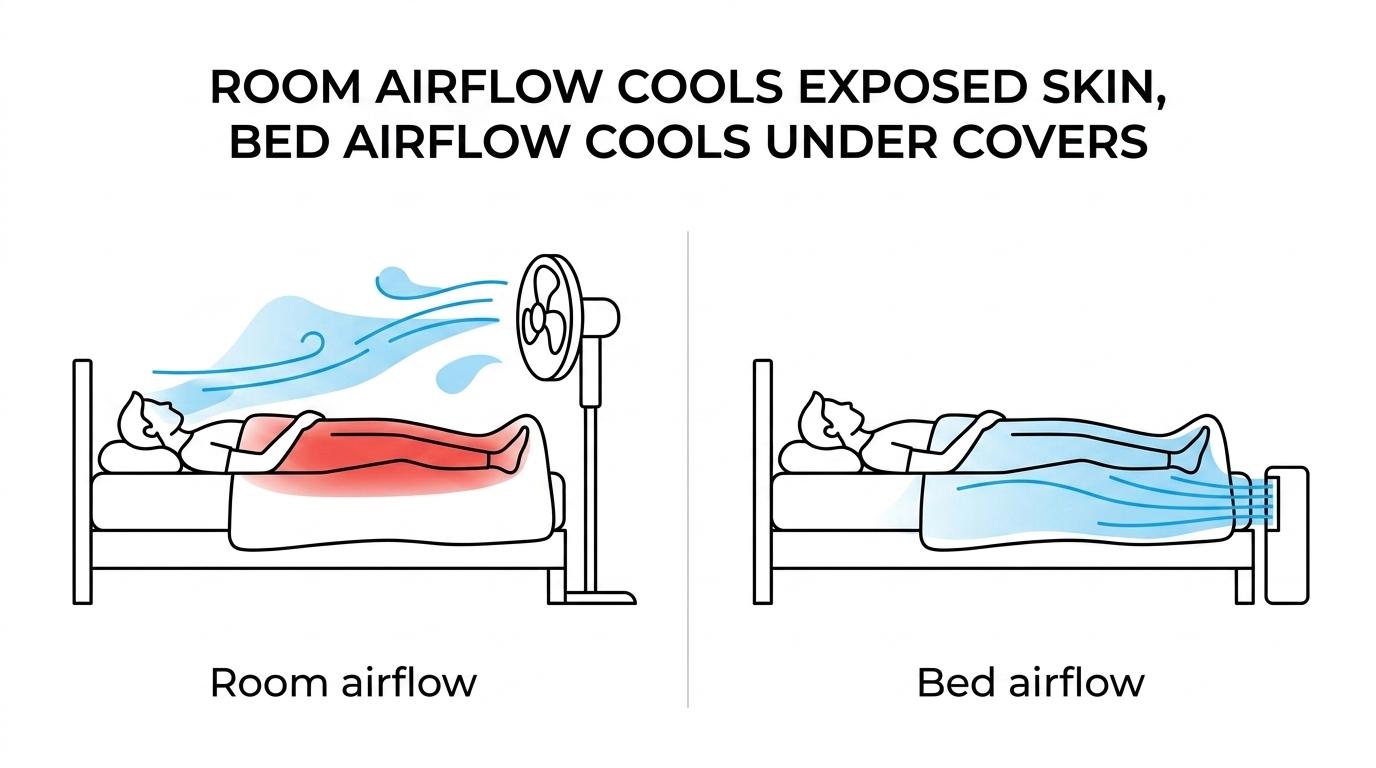
A regular bedroom fan cools exposed skin better, while a bed fan cools the under covers microclimate better. If your heat problem starts after you pull up the sheet, a bed fan is usually the more direct tool.
This is the simplest comparison. A ceiling fan, pedestal fan, or tower fan moves air through the room. That can improve general ventilation and make the whole space feel less stuffy. It is useful when the room itself is warm, but not brutally hot, and when your skin is exposed to the airflow.
A bed fan does something different. It pushes room air between the sheets, where body heat is building up. That helps evacuate heat and moisture from the bedding pocket around your skin. For people whose main complaint is, “I’m fine until I get into bed,” that difference is huge.
The bFan from www.bedfans-usa is a good example of the bed fan category to consider if a standard bedroom fan has stopped helping. It is built specifically for between the sheets airflow, and that is often the missing piece for hot sleepers, night sweats, and energy conscious households.
"bFan is a between the sheets bed fan, so it cools the microclimate around your body instead of just stirring bedroom air across the room."
A common misconception is that a bed fan is basically a box fan pointed at your feet. It isn’t. The point is controlled airflow where your body is actually overheating. That is also why many users can keep the room about 5°F warmer than they otherwise would and still sleep cool enough, which can reduce air conditioning costs.
Bedfan and BedJet both move room air, not colder than room air, but the cost difference is hard to ignore. A dual zone BedJet setup is over a thousand dollars, which is more than twice the price of two bedfans.
Start with the core fact, neither system cools the air itself. The BedJet does not cool the air. Bedfan does not cool the air. Both rely on the room air already present, which is why bedroom temperature still matters so much. If your room is in the recommended 60°F to 67°F range, both have a better shot at helping. If the room is hot and humid, both are limited.
Where the comparison gets practical is cost and use case. One BedJet is more than twice the price of a single bedfan. If two people share a bed and want separate airflow, two Bedfans create a dual zone microclimate control setup at a fraction of the cost of a dual zone BedJet, which runs over a thousand dollars.
There is also history here. The original Bedfan came to market years before BedJet was even thought of, and the bed fan category itself dates back to 2003. That matters because cooling the bed microclimate is not a brand new idea, it is a mature sleep comfort approach.
"The original Bedfan dates to 2003, years before BedJet entered the category, which matters if you want a long established bed fan design."
If you are deciding between them, ask a blunt question, do you need a premium priced system, or do you just need directed airflow under the covers? For many hot sleepers, menopause related night sweats, medication related overheating, or energy saving goals, a Bedfan style solution gets you where you need to go without the bigger price jump.
Start with pattern spotting, then simplify the bedroom, then rule out medical causes. A fan is a comfort tool, but repeated night sweats can also point to menopause, medication effects, thyroid issues, infections, or other health problems.
Step 1, track the pattern for one to two weeks. Note bedtime room temperature, humidity if you can measure it, bedding used, alcohol intake, late exercise, and whether the sweating is mild warmth or truly drenching. Also note whether it happens every night or only around hormonal shifts, medication timing, or stressful periods.
Step 2, simplify the sleep environment before buying a more powerful fan. Aim for a room in the 60°F to 67°F range. Drop heavy bedding. Try more breathable sheets. If the issue is trapped heat under the covers, a bed fan like the bFan or another Bedfan style setup is the more logical next step than just buying a louder tower fan. This is also where many people find they can raise the thermostat about 5°F and still sleep cooler because the body, not the whole room, is being targeted.
Step 3, know when to call a clinician. If night sweats are new, severe, drenching, or tied to fever, weight loss, chest symptoms, medication changes, or major fatigue, talk with a healthcare professional. Fans help comfort, but they do not diagnose why overheating is happening.
People often wait too long here because they assume poor sleep is just a comfort issue. Sometimes it is. Sometimes it is hormonal, medication effects, or medical. If the pattern looks bigger than the room, trust that instinct.
If the room stays hot, humid, or poorly ventilated, the fan is no longer the main fix. At that point, AC, dehumidification, insulation, shading, or targeted bed cooling will matter more.
There are a few clear thresholds. If your bedroom repeatedly stays above the recommended 60°F to 67°F range, your fan is fighting uphill. If relative humidity stays high enough that the room feels sticky, a dehumidifier may give you more real relief than more airflow. If the bedroom climbs toward extreme heat, the fan can become a weak answer fast. Public health guidance warns that when temperatures rise above 90°F, fan use can actually increase body temperature in some conditions.
This is where a layered strategy works best. Cool the room first. Control humidity second. Use airflow third. Then choose where you want that airflow to go. General room comfort, use a standard bedroom fan. Under covers heat and night sweats, look at a bed fan.
If your goal includes lower cooling costs, that decision matters even more. A Bedfan style setup uses room air and targets the bed, which is why many users can bump the thermostat up by about 5°F and still feel comfortable enough to sleep. With an average use around 18 watts, the energy math can look pretty attractive compared with overcooling the whole house just to make the bed tolerable.
The big picture is simple. When a bedroom fan stops solving overheating, it usually means the bedroom environment is asking too much of a fan. Fix the room, the humidity, the bedding, or the airflow target, and the sleep problem often gets much easier.
Copyright 2005 - present - Tompkins Research, Inc. & Kurt W. Tompkins All Rights Reserved DO NOT COPY. bFan® and the word bfan® in any format is a registered trademark of Kurt W. Tompkins the word BFAN® in any format shall not be used without written permission of the mark owner. This includes specifically Brookstone where you like to bait and switch, do not use my mark to bait customers.